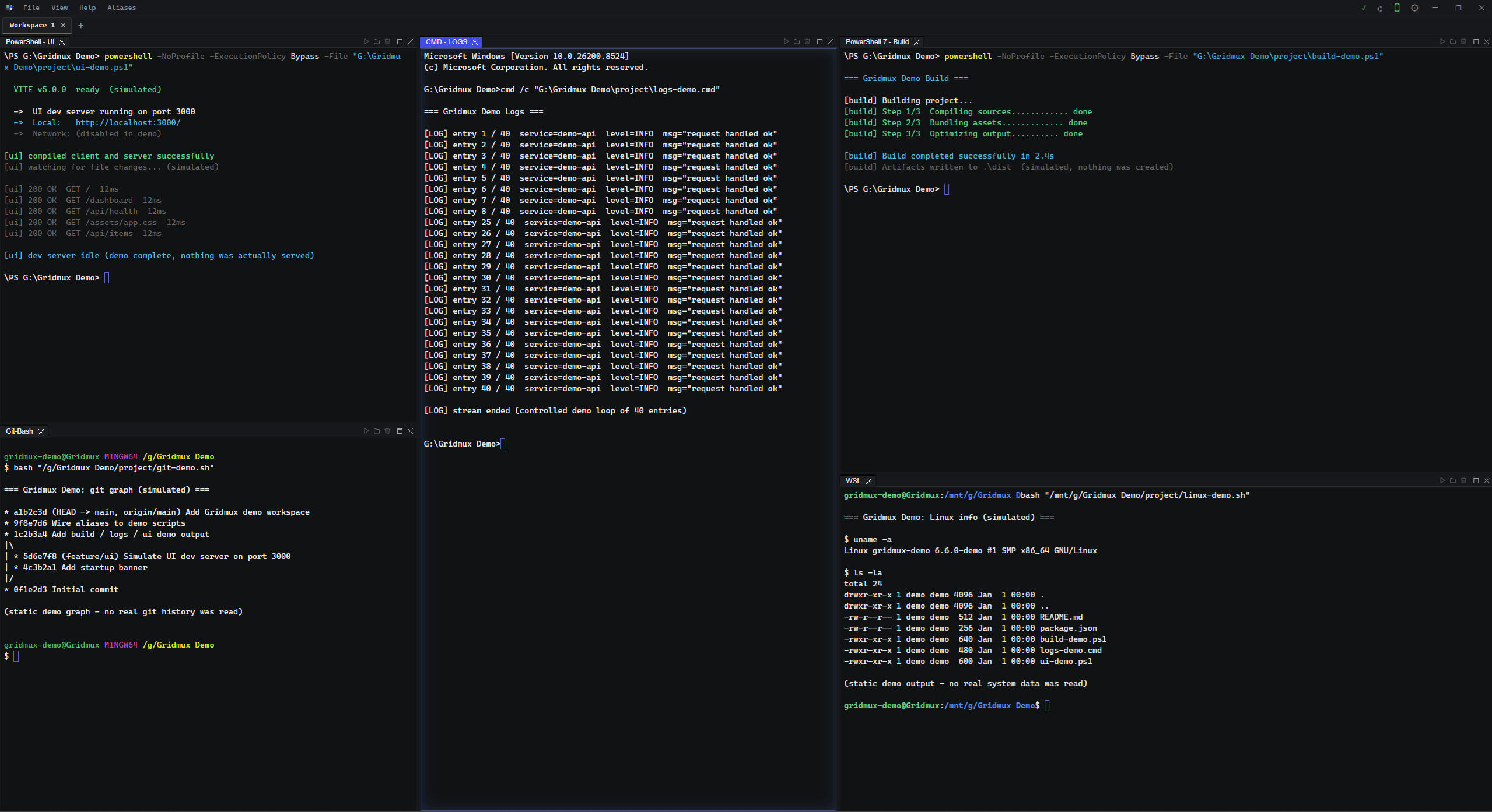
Gridmux splits your shells into resizable panels, groups them into
workspaces that survive a restart, and turns the commands you run
most into named aliases. Not a code editor — it runs alongside
the one you already use.
Overview
All in one place
A GUI terminal multiplexer, persistent workspaces, cross-platform
shell support, and alias-based automation — assembled into one
tool instead of stitched together by hand, and tied to no particular
editor. Each part stands on its own; together they're a single
command center for your terminal.
Positioning
Not a code editor
Gridmux doesn't open files for editing and doesn't replace your IDE.
It's the layer around your shells — terminals, workspaces,
automation. Keep whatever editor you already use; Gridmux runs the
terminal side and stays out of the way.
Capabilities
What Gridmux does
Persistent workspaces
Group terminals into workspaces — a backend server, a frontend dev server, a database shell, logs tailing — all side by side. Close the app and reopen it: panels, layout, and working directories come back exactly as you left them.
Shell multiplexing
Run PowerShell, CMD, Git Bash, WSL, bash, and zsh side by side in one window. Split into resizable panels, with multiple terminals per workspace.
Aliases & automation
Save commands as named aliases — with namespaces, variables, and groups. Run a multi-step setup by name instead of retyping it every time.
Cross-device sync
Sync your workspaces and configuration across your machines, so your setup follows you from one device to the next. Part of the Extended Subscription tier.
Gridmux Remote · Android
Drive your desktop from your phone
Gridmux Remote isn't a stripped-down mobile mode — it's full
control of your desktop from your Android phone, over your own
network. Open and switch workspaces, type into terminals and watch
live output stream, run aliases, apply templates, edit notes, and
use the AI Agent. Pair once by scanning a QR code; the connection is
secured with a self-signed certificate and per-request tokens. Part
of the Extended Subscription tier.
Get help, share feedback, report issues, and connect with other Gridmux users.
The Discord community is the fastest place to get support and stay updated
with new features, releases, and development progress.
Pricing
Free to start
The Base tier is free and covers everyday terminal work: multiple
workspaces, shell multiplexing, local Git, custom shortcuts, themes,
and a bring-your-own-key AI agent. Extended adds aliases, local
templates, and Git remote (push / pull / clone), and raises the limits
— more workspaces, unlimited terminals per workspace. The
Subscription tier adds cross-device sync, remote control, team
templates, and shared notes.